

Photo management: How to get your Christmas photos in order
Photo management: How to keep your Christmas photos in order
Christmas and New Year’s Eve, but also the last holiday or the children’s birthday party show it again: You take a huge number of photos, save them on your PC at best – and afterwards you can’t find anything you were looking for. It is particularly unfortunate when the most beautiful pictures languish on the camera’s memory card, in the smartphone or in the cloud. Software for sorting and viewing photos can help. But what is important when choosing a Photo management and which one is best suited? We shed some light on the subject.
What a good photo management system should be able to do
Photo management software has one main task that should be in the foreground: a clear management function. For this purpose, tag options (preferably for several pictures at the same time) should be usable, which can classify the photos according to the date they were taken, location, people in the picture, special events, and so on. The function of being able to tag pictures with personal keywords also makes later searches much easier Especially for those who take photos with several devices, it is also important that the programme can processdifferent image formats. Automatic cleaning of duplicates of the images not only makes the sorting clearer, but also saves a lot of storage space. And finally, the photo management programme should of course fulfil another important criterion: It must be easy and comprehensible to use – even for non-professionals.
Create a slideshow - the icing on the photo cake!
Clicking on each image over and over again to view it is tedious. And inviting friends or family to the slide show, which then takes place in a darkened room, accompanied by the clicking of the slide projector, is also a thing of the past. It would be much easier if the photo management system in Windows or Mac would automatically display certain pictures in a certain order. With the right software, this is no problem at all! For both operating systems, there are photo administrations that show appropriately stored pictures as a slide show. The playback speed can be set individually, and personally selected background music makes viewing the show even more enjoyable We have tested two programmes here:
Movavi Photo Manager
The Movavi Photo Manager is a classic photo management software. It offers sorting for images in all common formats such as RAW, JPEG or PNG.
The programme has the following functions:
- Face recognition
- Tagging photos
- Geolocation
- Duplicate Finder
- Backup creation
- Automatic album creation
In addition, Movavi allows you to edit images, for example to crop, flip or rotatethem. Movavi Slideshow Maker is also able to generate effective slideshows with smooth transitions including individual sound.
Magix Photostory
If you are into really good slideshows and want to create a slideshow that almost looks like a film, you can hardly get around this software. The latest version – Magic Photostory Deluxe – comes up with features that convince even professionals. These include, among others:
- pin-sharp images on PC, tablet or TV screen thanks to 4K export
- easy-to-use image optimisation
- advanced image editing
- Background music, voices and/or sounds
- the image can be edited to the beat of the background music
- Magic Travel Maps enables the insertion of animated travel routes
- various animations and effects for an entertaining slide experience
- Zoom in and out to highlight important aspects
Various blending optionsare available for varied transitions between the individual images Another plus are the individually designable intros and outros.
Conclusion: Good photo processing does more than simply sorting pictures. In this day and age, when smartphones and digital cameras make it possible to take snapshots in unlimited quantities, an appropriate programme is indispensable for professionals as well as hobby photographers. Especially with regard to further features such as good image editing and the possibility to create an impressive slide show.
Header image: © REDPIXEL, stock.adobe.com


The tax return is due: The best tax software at a glance
The tax return is due: An overview of the best tax software
The tax return is not just a chore, it is the basis for refunds and write-offs. Only with a tax return can the benefits decided by the legislator for the taxpayer be claimed. However, there are fixed deadlines for filing. The tax return should therefore be prepared in good time. Waiting until the end of the period is risky, because it can take time to pick out the required information. A good working basis is a tax return adapted to the individual taxpayer Tax software.
The right tax software helps to save money
A tax advisor charges at least 200 euros for even the simplest tax return, while the low-cost programmes for preparing one’s own hardly cost 10% of this sum. For recurring and more complex tax returns, there are programmes that can be installed on your own computer. Alternatively, there is a selection of online solutions that are started in the browser and for which no installation is necessary.
Tax software comparison for own installation
- WISO tax programme 2020 from the Buhl company This software is also known as Wiso Tax is available for Windows and MacOS. Its functions for automatic data entry are among the most extensive among comparable programmes. This also includes the recording of data deposited with the tax office. This not only saves time and effort in typing, but also eliminates a possible source of error. Data can also be entered into the software directly from bank accounts via the banking app. The programme's receipt manager then manages invoices and receipts. Data entry from such documents on paper is done via a camera from the computer or mobile device. As a source of information, the programme also includes a tax guide in book form. The book is supplemented by online sources and videos.
- SteuerSparErklärung from Wolters Kluwer This software is also available for Windows and MacOS. The programme is particularly convincing due to its well thought-out user guidance when preparing the tax return. The collection of data is linked to automatically displayed tax tips. Part of the system is also the registration with the tax office and the transfer of data stored with the tax office. The information and tax tips offered by the programme are available digitally. If required, a book containing this information can be requested free of charge by post. Before the tax return is submitted, the programme starts an electronic tax checker that alerts the user to gaps and inconsistencies.
- T@x or Tax 2020 from the Buhl company This programme is particularly suitable for simple tax return cases. Typical users will be pensioners, students and employees with not particularly complicated tax circumstances. Similar to the Wiso tax programme, this product convinces with good user guidance and explanations optimised for user-friendliness. Up to five tax returns can be submitted with this programme.
- T@x Professional from the Buhl company This product also handles more complicated cases and is therefore suitable for freelancers and entrepreneurs. Of particular interest to them are the forms included in the system for turnover tax and trade tax. The software also allows up to 15 tax returns.
- Taxman from the company Lexware Unfortunately, this programme is not available for MacOS. As a special service, however, the company provides its own versions, which are specially adapted to the tax situation of the self-employed, landlords and pensioners. The enclosed tax guide in book form is well done. It includes sample letters, legal texts and instructions on how to fill them in. The programme is suitable for users ranging from employees and freelancers to small business owners.

Tax software comparison for online solutions in the browser
The following systems do not require installation, but run entirely in the browser. This means that the software works independently of the computer’s operating system.
- smartsteuer.de This system requires neither registration nor login. A tax return can be prepared on a trial basis; costs are only incurred when the return is submitted to the tax office. Like installed programmes, the system guides the user step by step through the preparation of the tax return.
- lohnsteuer-kompakt.de All types of income can be recorded here, and here, too, costs only arise when the tax return is sent to the tax office. The system grants a discount for more than one tax return.
- steuerfuchs.de Steuerfuchs is one of the most favourable offers for the electronically supported preparation of a tax return.
- elster.de The name stands for "electronic tax return" and is free software provided by the tax office itself. Forms and functions for managing data can also be found on the website. However, no tax-saving tips are offered.
Practical tips for the tax return
At the very beginning, obtaining basic informationabout the tax system should be the first step.Even the best programme cannot replace this step. For a simple case with only substantial income and few write-offs, it is advisable to start with one of the cheapest programmes. If the tax return is more complicated, it is worthwhile to invest in a more expensive packagethat best suits your own situation. A sophisticated tax return requires a careful tax software comparison. Even if external advice is then taken, it makes sense to look into tax software.
Header image: © Martin Schlecht, stock.adobe.com
The tax return is due: The best tax software at a glance
The tax return is due: An overview of the best tax software
The tax return is not just a chore, it is the basis for refunds and write-offs. Only with a tax return can the benefits decided by the legislator for the taxpayer be claimed. However, there are fixed deadlines for filing. The tax return should therefore be prepared in good time. Waiting until the end of the period is risky, because it can take time to pick out the required information. A good working basis is a tax return adapted to the individual taxpayer Tax software.
The right tax software helps to save money
A tax advisor charges at least 200 euros for even the simplest tax return, while the low-cost programmes for preparing one’s own return cost barely 10% of this sum. For recurring and more complex tax returns, there are programmes that can be installed on your own computer. Alternatively, there is a selection of online solutions that are started in the browser and for which no installation is necessary.
Tax software comparison for own installation
- WISO Tax Program 2020 from the Buhl company This software is also known as Wiso Tax is available for Windows and MacOS. Its functions for automatic data entry are among the most comprehensive among comparable programmes. This also includes the recording of data deposited with the tax office. This not only saves time and effort in typing, but also eliminates a possible source of error. Data can also be entered into the software directly from bank accounts via the banking app. The programme's receipt manager then manages invoices and receipts. Data entry from such documents on paper is done via a camera from the computer or mobile device. As a source of information, the programme also includes a tax guide in book form. The book is supplemented by online sources and videos.
- SteuerSparErklärung from Wolters Kluwer This software is also available for Windows and MacOS. The programme is particularly convincing due to its well thought-out user guidance when preparing the tax return. The collection of data is linked to automatically displayed tax tips. Part of the system is also the registration with the tax office and the transfer of data stored with the tax office. The information and tax tips offered by the programme are available digitally. If required, a book containing this information can be requested free of charge by post. Before the tax return is submitted, the programme starts an electronic tax checker that alerts the user to gaps and inconsistencies.
- T@x or Tax 2020 from the Buhl company This programme is particularly suitable for simple tax return cases. Typical users will be pensioners, students and employees with not particularly complicated tax circumstances. Similar to the Wiso tax programme, this product convinces with good user guidance and explanations optimised for user-friendliness. Up to five tax returns can be submitted with this programme.
- T@x Professional from the Buhl company This product also handles more complicated cases and is therefore suitable for freelancers and entrepreneurs. Of particular interest to them are the forms included in the system for turnover tax and trade tax. The software also allows up to 15 tax returns.
- Taxman from the company Lexware Unfortunately, this programme is not available for MacOS. As a special service, however, the company provides its own versions, which are specially adapted to the tax situation of the self-employed, landlords and pensioners. The enclosed tax guide in book form is well done. It includes sample letters, legal texts and instructions on how to fill them in. The programme is suitable for users ranging from employees and freelancers to small business owners.
Tax software comparison for online solutions in the browser
The following systems do not require installation, but run entirely in the browser. This means that the software works independently of the computer’s operating system.
- smartsteuer.de This system requires neither registration nor login. A tax return can be prepared on a trial basis; costs are only incurred when the return is submitted to the tax office. Like installed programmes, the system guides the user step by step through the preparation of the tax return.
- lohnsteuer-kompakt.de All types of income can be recorded here, and here, too, costs only arise when the tax return is sent to the tax office. The system grants a discount for more than one tax return.
- steuerfuchs.de Steuerfuchs is one of the most favourable offers for the electronically supported preparation of a tax return.
- elster.de The name stands for "electronic tax return" and is free software provided by the tax office itself. Forms and functions for managing data can also be found on the website. However, no tax-saving tips are offered.
Practical tips for the tax return
At the very beginning, obtaining basic informationabout the tax system should be the first step.Even the best programme cannot replace this step. For a simple case with only substantial income and few write-offs, it is advisable to start with one of the cheapest programmes. If the tax return is more complicated, it is worthwhile to invest in a more expensive packagethat best suits your own situation. A sophisticated tax return requires a careful tax software comparison. Even if external advice is then taken, it makes sense to look into tax software.
Header image: © Martin Schlecht, stock.adobe.com

Editing video is easy - the best programmes for video editing
Video editing made easy - the best programmes for video editing
Thanks to modern technologies, skilful video editing is possible even for non-professionals. Simple video editing programmes now go far beyond mere trimming. The numerous functions make extensive editing possible. In this way, anyone can turn their private videos into real eye-catchers to share on social media channels or to create valuable memories for their private video collection. But which are the best video editing programmes for beginners and what are the PC requirements?
Skilled video editing turns your film into an Oscar contender!
No expensive professional programmes are necessary to create an Oscar-worthy film.Simple video editing programs make it possible for everyone to give free rein to their creativity to create real works of art Once you start working with video editing, you will quickly discover the almost unlimited possibilities. Sophisticated video effects such as filters, graphics or transitions can now be found in many inexpensive video editing programmes. In this way, private videos can be skilfully transformed into true Oscar candidates. Videos essentially consist of three rough building blocks: the video recordings themselves, the music, the sounds as well as graphic elements The video recordings are therefore the cornerstone of every film. These recordings can easily be enhanced with audio effects such as music and sounds, which should not be missing from any masterpiece. Graphic elements include everything that is additionally faded in. For example, credits or other text overlays. Simple video editing programmes offer countless creative possibilities. It is up to the creator to discover all these functions and, together with the three basic building blocks, to create a work of art. Also important in a good film are the story and the development of the story as well as a skilful build-up of tension.

Simple video editing programmes for a top film experience
The following programs are inexpensive and particularly well suited for beginners:
Wondershare Filmora 9 This is a particularly beginner-friendly video editing programme. Beginners will find numerous functions here without feeling overwhelmed. The software focuses on simple operation and a favourable price If you would like to try out the programme first, you can Wondershare Filmora 9 offers a free trial version. The disadvantage of this, however, is that the films are marked with a watermark. The basic functions of Wondershare Filmora 9:
- Users can edit videos, photos and audio files directly
- Colour correction and error editing
- Up to 100 video tracks simultaneously
- Creative video effects such as filters, graphics, green screen effects and overlays
- Automatic scene detection for easy editing
- Advanced audio features such as noise reduction and an audio equaliser for fine-tuning music and other audio clips

Movavi This inexpensive video editing programme is clearly aimed at beginners. For anyone who does not want to spend a long time learning a complicated programme, it is Movavi an optimal choice. With Movavi, beginners have the opportunity to learn the basics of video editing excellently. A clear user interface and integrated instructions make this possible With Movavi you get good video editing software for little money. If you are not sure before buying, you can test the programme for free. The advantages of Movavi at a glance:
- Beginner-friendly operation
- Many effects, transitions and filters
- Also suitable for animated slide shows
Magix Video easy Also ideal for beginners. It is easy to use and beginners are not overwhelmed. The software attaches importance to the fact that creators quickly achieve their first sense of achievement Anyone who wants to edit their video quickly and easily, without the process taking up a lot of time, will make a good choice with Magix Video easy is a good choice. The software is so easy to use mainly because only basic tools and settings are available to the user. Magix Video easy is definitely not a programme with a large selection of effects or filters. However, the programme is absolutely sufficient for quickly editing the video recordings of the last family celebration and thus creating a memory Hobby filmmakers and beginners will find Magix Video easy a simple alternative to comparable programmes.
Here's what your PC needs for video editing
For the PC to be suitable for video editing, the hardware must meet a few criteria. Video editing is an extremely computationally and memory intensive process. A detailed description of the various hardware components would go beyond the scope of this article. There are numerous articles on the Internet that describe exactly what requirements a PC must meet for video editing. Ultimately, it also depends on the demands of the user. For those who want to create high-resolution 4K or even 8K films, even some seasoned gaming PCs are too slow. Beginners who are just starting to deal with the topic of video editing and use simple video editing programmes usually do not need a high-end PC. Anyone who is not sure whether their own PC meets the performance requirements can simply check the minimum requirements of the selected software. If your own PC does not meet the requirements, it does not have to be a completely new computer. With desktop PCs, individual parts can simply be replaced to increase performance.
Header image: © pvl, stock.adobe.com
Editing video is easy - the best programmes for video editing
Video editing made easy - the best programmes for video editing
Thanks to modern technologies, skilful video editing is possible even for non-professionals. Simple video editing programmes now go far beyond mere trimming. The numerous functions make extensive editing possible. In this way, anyone can turn their private videos into real eye-catchers to share on social media channels or to create valuable memories for their private video collection. But which are the best video editing programmes for beginners and what are the PC requirements?
Skilled video editing turns your film into an Oscar contender!
No expensive professional programmes are necessary to create an Oscar-worthy film.Simple video editing programs make it possible for everyone to give free rein to their creativity to create real works of art Once you start working with video editing, you will quickly discover the almost unlimited possibilities. Sophisticated video effects such as filters, graphics or transitions can now be found in many inexpensive video editing programmes. In this way, private videos can be skilfully transformed into true Oscar candidates. Videos essentially consist of three rough building blocks: the video recordings themselves, the music, the sounds as well as graphic elements The video recordings are therefore the cornerstone of every film. These recordings can easily be enhanced with audio effects such as music and sounds, which should not be missing from any masterpiece. Graphic elements include everything that is additionally faded in. For example, credits or other text overlays. Simple video editing programmes offer countless creative possibilities. It is up to the creator to discover all these functions and, together with the three basic building blocks, to create a work of art. Also important in a good film are the story and the development of the story as well as a skilful build-up of tension.

Simple video editing programmes for a top film experience
The following programs are inexpensive and particularly well suited for beginners:
Wondershare Filmora 9 This is a particularly beginner-friendly video editing programme. Beginners will find numerous functions here without feeling overwhelmed. The software focuses on simple operation and a favourable price If you would like to try out the programme first, you can Wondershare Filmora 9 offers a free trial version. The disadvantage of this, however, is that the films are marked with a watermark. The basic functions of Wondershare Filmora 9:
- Users can edit videos, photos and audio files directly
- Colour correction and error editing
- Up to 100 video tracks simultaneously
- Creative video effects such as filters, graphics, green screen effects and overlays
- Automatic scene detection for easy editing
- Advanced audio features such as noise reduction and an audio equaliser for fine-tuning music and other audio clips
Movavi This inexpensive video editing programme is clearly aimed at beginners. For anyone who does not want to spend a long time learning a complicated programme, it is Movavi an optimal choice. With Movavi, beginners have the opportunity to learn the basics of video editing excellently. A clear user interface and integrated instructions make this possible With Movavi you get good video editing software for little money. If you are not sure before buying, you can test the programme for free. The advantages of Movavi at a glance:
- Beginner-friendly operation
- Many effects, transitions and filters
- Also suitable for animated slideshows
Magix Video easy Also ideal for beginners. It is easy to use and beginners are not overwhelmed. The software attaches importance to the fact that creators quickly achieve their first sense of achievement Anyone who wants to edit their video quickly and easily, without the process taking up a lot of time, will make a good choice with Magix Video easy is a good choice. The software is so easy to use mainly because only basic tools and settings are available to the user. Magix Video easy is definitely not a programme with a large selection of effects or filters. However, the programme is absolutely sufficient for quickly editing the video recordings of the last family celebration and thus creating a memory Hobby filmmakers and beginners will find Magix Video easy a simple alternative to comparable programmes.
Here's what your PC needs for video editing
For the PC to be suitable for video editing, the hardware must meet a few criteria. Video editing is an extremely computationally and memory intensive process. A detailed description of the various hardware components would go beyond the scope of this article. There are numerous articles on the Internet that describe exactly what requirements a PC must meet for video editing. Ultimately, it also depends on the demands of the user. For those who want to create high-resolution 4K or even 8K films, even some seasoned gaming PCs are too slow. Beginners who are just starting to deal with the topic of video editing and use simple video editing programmes usually do not need a high-end PC. Anyone who is not sure whether their own PC meets the performance requirements can simply check the minimum requirements of the selected software. If your own PC does not meet the requirements, it does not have to be a completely new computer. In the case of desktop PCs, individual parts can simply be replaced to increase performance.
Header image: © pvl, stock.adobe.com
Windows 7, 8 and 10 - What are the differences?
Windows 7, 8 and 10 - What are the differences?
Which version of Windows is right for me? You may have asked yourself this question before and even thought about switching to another higher version. What is there to consider? What are the differences? In this Windows 7, 8 and 10 comparison, we take a close look at all 3 operating systems and explain their features. After that, you should be sure which Windows is right for you. All 3 versions are actively developed by Windows and regularly provided with updates. This primarily ensures more security against attackers and other malicious programmes, but also stability. If you still have an older operating system such as Windows XP, we strongly recommend that you switch to 7, 8 or 10. All versions below this are no longer supported and are therefore no longer provided with security updates. If you compare Windows 7, 8 and 10, the first thing you notice is the graphical user interface, which has changed a lot. From Windows 8 onwards, Microsoft caused a lot of confusion with the tiles instead of the classic desktop and quickly took a different course. With updates and extensions, the classic desktop screen with Start menu was brought back, because that is what users are and were used to. In the background, some technical developments and changes have taken place, which we would like to discuss in more detail in the following sections.
Operation and start menu
Windows 7 has the classic Start menu, as users have always been used to. With version 8 came the big change with the tile interface, which caused a downright dislike among many users. As already mentioned, several updates were rolled out, with which Windows 8.1 got back its classic desktop overview with Start menu. Nevertheless, Microsoft has not abandoned its concept with the tiles, as can be seen very clearly in Windows 10. Still, the good old Start button at the bottom left is back and makes for a much friendlier experience.
Search under Windows
In Windows 7, the search field can still be found in the Start menu, where programmes and files of all kinds can be found. With Windows 8, all you have to do is open the tile interface, now you can simply enter a term without having to click on a search field. Search results from the Bing search engine are also displayed. In Windows 10, on the other hand, the search field can be found in the taskbar and can alternatively be displayed as a small icon. Microsoft has also released the search assistant Cortana with Windows 10, which responds directly to voice commands and answers them.
The functionality of Windows
Those who want to use multiple monitors do not have to do without this in all 3 versions. With Windows 10, even virtual desktops can be managed for the first time, which is not the case with 7 and 8. You want to access files from your laptop, tablet or smartphone at the same time and share them with others? Then OneDrive is the right thing to do! However, this handy tool is only available for Windows 8 and 10, not for 7. Windows 7 still works with Internet Explorer 8, while Windows 8 and 10 work with Internet Explorer 11 or 11 Edge.
Safety First! This is how safe the Windows versions are
While you have to install an extra virus scanner with Windows 7, 8 and 10 come with the in-house virus scanner Defender. This is a security software from Microsoft that scans your files for viruses, malware and spyware. With Windows 8 and 10, the new Secure Boot system was released, which provides more security when starting the computer. Windows 7 does not yet have this tool on board. To make a backup of the files, Windows 7 still has the classic backup. Windows 8 and 10 have a file version history, which automatically backs up data in the background.
Performance
While DirectX 11 is still installed on Windows 7, Windows 8 and 10 come with DirectX 11.2 and 12. There are also some differences in the supported USB versions. Windows 7 still works with 2.0, Windows 8 and 10 support USB 3.0 and 3.1. This allows higher data rates, so files are copied back and forth to your USB medium or device faster.
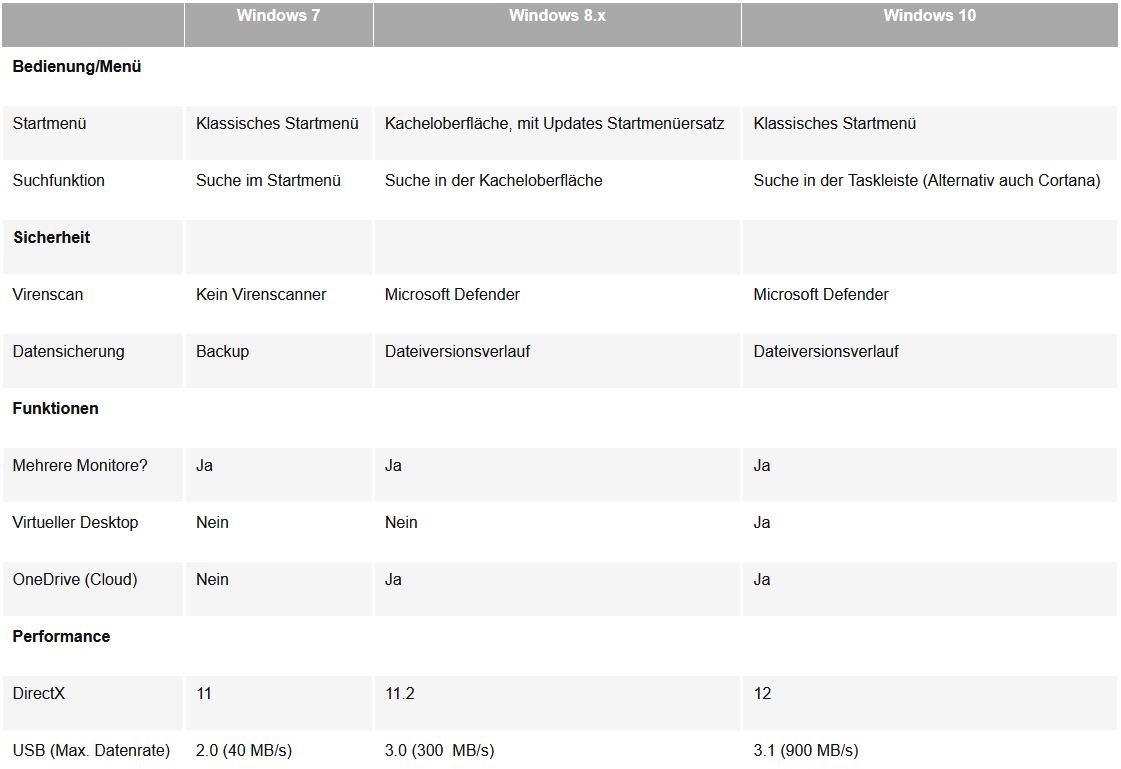
Comparison table
In the following we show you once again the most important facts and differences between Windows 7, 8 and 10 in a clear table.
Header image: © monticellllo, stock.adobe.com