
Aktivierung von Hide My Ass Pro VPN by Avast
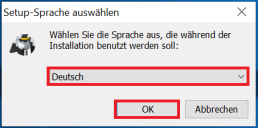
1. Select setup language
After you have completed the download, click on the .exe file and get ready for the installation.Here you can choose on which language you want to have the software and continue with „OK“.
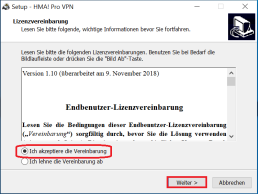
2. the license agreement
Accept the agreement now and then go to „Next“.
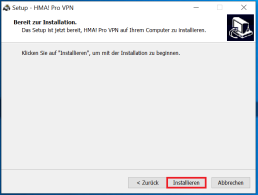
3. ready for installation
Now you can start „Installing“.
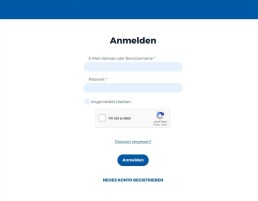
4. log in/register
Wichitg: the Product key must be obtained from the website https://my.hidemyass.com/de-de/ You can create an account for free. Log in with your login details, if you do not have an account for this please create one.
5. activate product
Here you can have the key activated, that you have received from us.
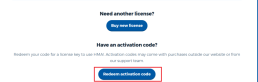
6. enter product key
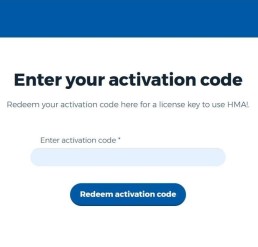
Please enter the activation code here and activate it to get the direct product key.
7. your license has been successfully activated
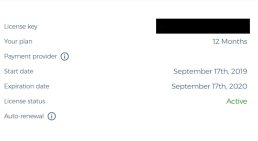
As you can see was your license successfully activated. All you need is the Product key (which has just been highlighted in black) copy out and paste this in the application.
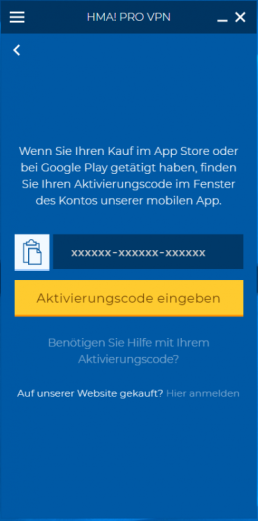
8. enter activation code
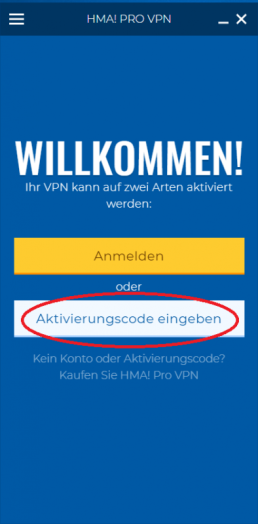
The last step – The installation is finished and now you have to enter the activation code via the installed VPN program to be able to use the full version (License Key).
Header-Bild: © arrow, stock.adobe.com